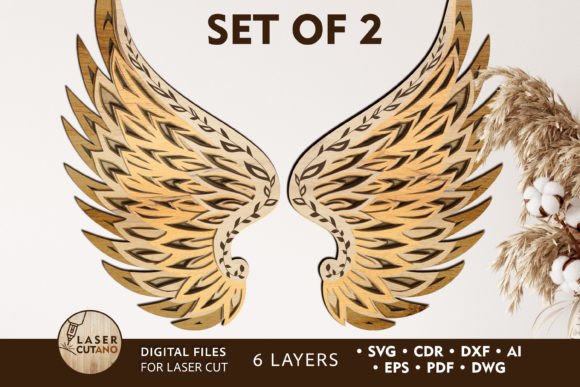
Choosing the Right ANGELS WINGS Laser Paper Cut Template for Multi-Layered Decor
Creating dimensional wall art requires more than just a pretty image; it demands a file structure that understands depth, material constraints, and assembly logic. The ANGELS WINGS Laser Paper Cut Template represents a specific category of digital design files engineered for multi-layer fabrication. Unlike standard single-vector illustrations, this template is built as a layered system intended to create a three-dimensional effect when stacked. For hobbyists and professionals alike, understanding the distinction between a simple SVG cut file and a purpose-built multilayer layout is critical before investing time in cutting materials.
This design approach utilizes six distinct layers to build volume, transforming a flat silhouette into a textured piece suitable for boho-style interiors or spiritual decor spaces. When evaluating whether this specific template fits your project needs, it is essential to consider not just the aesthetic outcome, but the technical requirements regarding machine compatibility, material selection, and the assembly process.
Understanding the Multilayer Architecture
The core value of the ANGELS WINGS Laser Paper Cut Template lies in its architecture. Standard clipart or basic SVGs are often designed for printing or single-pass cutting. In contrast, this template is pre-separated into six unique layers. This separation is not arbitrary; it is calculated to create shadow and depth when each layer is offset and glued upon the previous one.
For users operating CNC routers or laser cutters, this pre-separation saves significant preprocessing time. Instead of manually duplicating paths and calculating offsets in software like Illustrator or CorelDRAW, the designer has already determined the optimal spacing for a 3D effect. The finished product typically measures 14 x 11 inches, a size that offers substantial visual presence without being overwhelming for standard home crafting setups. However, the scalability of the design introduces a critical trade-off that users must evaluate.
Scalability and Structural Integrity
One of the most common questions regarding digital cut files is flexibility in sizing. With the ANGELS WINGS Laser Paper Cut Template, you can increase the overall dimensions of the design with relative ease, provided your machine bed allows for it. Enlarging the design generally strengthens the structural integrity of the cut pieces, making them easier to handle and glue.
Conversely, reducing the size presents a tangible risk. Because the design features intricate feather details and thin connecting elements typical of angel wing imagery, shrinking the file below its intended ratio can cause these delicate parts to become too fragile. If you are working with wood or acrylic, reducing the size too much may result in pieces that break during the weeding process or fail to hold together under their own weight. Therefore, while the file formats support scaling, practical application suggests adhering close to the recommended 14 x 11 inch baseline or only scaling up.
Material Compatibility and Thickness Considerations
The versatility of this template is evident in its broad material compatibility. It is optimized for use with plywood, MDF, acrylic, plexiglass, metal, cardboard, and heavy paper. However, the "best" material depends entirely on the desired finish and the capabilities of your cutting equipment.
For wood-based projects, the recommended thickness ranges from 3mm to 6mm (approximately 1/8 inch to 1/4 inch). Using 3mm plywood creates a lighter, more delicate stack, while 6mm MDF provides a robust, chunky profile that casts deeper shadows. When using acrylic or plexiglass, the transparency of the material interacts differently with the layers, potentially requiring a backing board to make the stratification visible. Metal cutting, often done via fiber laser, requires precise power settings to avoid warping the thin elements of the wing design.
A crucial step often overlooked in the planning phase is the finishing process. The guidelines for this template explicitly state that each layer should be painted before gluing. Attempting to paint the assembled 3D structure is impractical, as the brush cannot reach the recessed areas between the stacked layers. This requirement adds time to the project but significantly enhances the professional quality of the final piece.
File Formats and Machine Ecosystems
Interoperability is a major factor when selecting a digital asset. The ANGELS WINGS Laser Paper Cut Template is distributed as a .zip archive containing a comprehensive suite of vector formats: .AI, .SVG, .DXF, .DWG, .CDR, .EPS, and .PDF. This variety ensures that the file is not locked into a single software ecosystem.
- SVG and AI: Ideal for users working with Cricut, Silhouette, or Adobe Illustrator. These formats preserve editability for those who wish to tweak individual feather paths.
- DXF and DWG: The industry standards for CAD software and many CNC router controllers. These are essential for users prioritizing precision engineering over artistic editing.
- CDR and EPS: Cater to CorelDRAW users and professional print shops that rely on PostScript standards.
- PDF: Useful for quick visualization or sending to services that accept PDF vectors for cutting.
It is important to note that immediately after purchase, the user receives the .zip file. A common point of confusion for beginners is attempting to import the compressed folder directly into cutting software. The folder must be unzipped first to access the usable vector files inside. Failure to do so will result in errors when loading the design into LightBurn, VCarve, or Cricut Design Space.
Comparing Approaches: Single Layer vs. Multilayer
When deciding if this template is the right choice, it helps to compare the multilayer approach against single-layer alternatives. A single-layer angel wing cutout is faster to produce. It requires one pass of the laser or blade, minimal weeding, and zero assembly time. It is an excellent choice for ornaments, stencils, or applications where a flat profile is preferred.
However, the ANGELS WINGS Laser Paper Cut Template targets a different aesthetic goal: depth. The six-layer construction mimics the look of hand-carved relief or intricate paper quilling. The trade-off is time and complexity. You are essentially committing to cutting the same shape six times, organizing the parts, painting them individually, and then aligning them perfectly during assembly. Misalignment in a multilayer project is more noticeable than in a single-layer one, as it disrupts the shadow lines that create the 3D illusion.
For users who enjoy the process of crafting as much as the result, the multilayer option offers a more rewarding experience. It transforms a commodity cut file into a bespoke art piece. For high-volume production environments where speed is the primary metric, a single-layer version might be more efficient, though it lacks the premium feel of the stacked design.
Ideal Use Cases and Limitations
This design shines in specific contexts. It is particularly well-suited for boho-style wall panels, nursery decor, and meditation spaces where soft, organic shapes are valued. The ability to use different materials for different layers—for example, alternating between stained wood and painted MDF—allows for custom color gradients that are impossible with a single cut.
Limitations do exist. As mentioned, the fine details require sharp tools and well-calibrated machines. A dull laser lens or a worn blade on a vinyl cutter may struggle with the inner curves of the feathers, leading to burn marks or torn edges. Additionally, the gluing process requires patience; using the wrong adhesive can cause warping in thinner materials like paper or cardstock, ruining the flush alignment of the layers.
Ultimately, the ANGELS WINGS Laser Paper Cut Template is a robust resource for creators who want to elevate their wall art beyond the flat plane. It bridges the gap between digital design and tactile sculpture. By providing multiple file formats and clear material guidelines, it accommodates a wide range of skill levels, from the DIY enthusiast with a desktop cutter to the professional shop owner running a CNC router. Success with this template relies less on the file itself and more on the maker's willingness to engage with the layered construction process, respecting the material limits and taking the necessary time to finish each component before assembly.