Laser Cut Display Cabinet SVG: A Practical Guide to Digital Fabrication
There is a distinct satisfaction in watching a flat sheet of material transform into a functional, three-dimensional object. For makers, interior design enthusiasts, and small business owners, the Laser Cut Display Cabinet SVG represents more than just a digital file; it is a bridge between conceptual design and tangible reality. This specific type of digital asset allows users to create elegant storage solutions using widely accessible tools like laser cutters, CNC routers, and even advanced craft cutters. Whether you are looking to organize a collection of miniature figures, showcase artisanal products, or simply add a touch of modern geometry to your living space, understanding how to leverage this design file can significantly streamline your creative process.
Understanding the Versatility of the Design File
At its core, a Laser Cut Display Cabinet SVG is a vector-based instruction set. Unlike raster images that rely on pixels, vector files use mathematical paths to define shapes, ensuring that every cut line remains crisp regardless of the scale. This precision is critical when assembling interlocking parts, which is the hallmark of most laser-cut furniture and décor projects. The beauty of this particular design lies in its adaptability. It is not restricted to a single machine type. While optimized for high-power lasers like the Glowforge or industrial CO2 lasers, the design is equally compatible with diode lasers, CNC wood routers, and blade-based cutters such as Cricut or Silhouette machines when working with thinner materials like cardstock or heavy cardboard.
The inclusion of multiple file formats—AI, EPS, SVG, DXF, and PNG—ensures that users are not locked into a specific software ecosystem. Whether you prefer the robust toolset of Adobe Illustrator, the open-source flexibility of Inkscape, or the user-friendly interface of proprietary cutter software, the design integrates seamlessly. This cross-platform compatibility removes technical barriers, allowing creators to focus on the build rather than file conversion headaches.
Real-World Applications for Hobbyists and Collectors
For hobbyists, the primary appeal of a display cabinet is organization mixed with aesthetics. Consider the avid collector of action figures, model cars, or vintage cameras. Off-the-shelf shelving often fails to accommodate irregularly shaped items or lacks the visual flair to complement a dedicated display area. By utilizing a Laser Cut Display Cabinet SVG, a collector can customize the internal dimensions to fit their specific treasures. The layered nature of these designs allows for the creation of depth and shadow, turning a simple storage unit into a stage for the items within.
Another common scenario involves the home office or study. Professionals who work from home often struggle with clutter. A custom-built display cabinet can serve a dual purpose: hiding unsightly cables or office supplies behind closed doors while showcasing books, plants, or awards on open shelves. The clean lines typical of laser-cut designs align well with modern minimalist interiors, offering a sleek alternative to bulky, traditional furniture. Because the design is easy to customize, users can adjust the height and width to fit awkward nooks or alcoves that standard furniture cannot occupy.
Commercial Uses for Small Businesses and Makers
Beyond personal use, the Laser Cut Display Cabinet SVG holds significant value for small business owners, particularly those in retail and e-commerce. Product photography is a critical component of online sales, and having a consistent, professional-looking backdrop can elevate brand perception. Artisans selling jewelry, ceramics, or handmade soaps can use these cabinets as portable display units for craft fairs and markets. The modular design means they can be flat-packed for transport and quickly assembled on-site, saving valuable booth space and setup time.
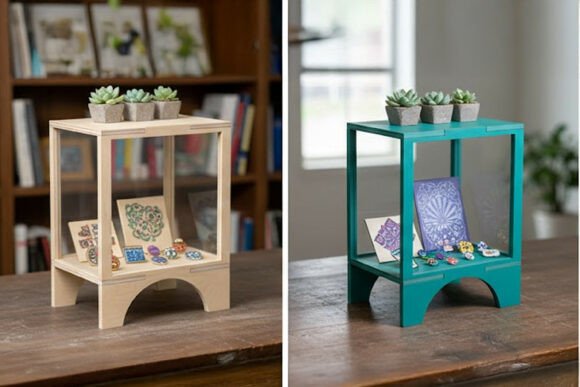
Furthermore, boutique retailers can use these cabinets as point-of-sale displays. Imagine a coffee shop showcasing bags of local beans or a bookstore highlighting new arrivals. The ability to produce these units in-house reduces reliance on expensive, mass-produced fixtures. If a store layout changes, the cabinets can be disassembled and reconfigured or even recycled into new projects, supporting sustainable business practices. The realistic 3D mockup style often seen in previews helps business owners visualize the final product before committing to material costs, reducing waste and ensuring the design aligns with their brand aesthetic.
Material Considerations and Structural Integrity
Choosing the right material is perhaps the most critical decision when working with a Laser Cut Display Cabinet SVG. The structural integrity of the final piece depends heavily on the thickness and rigidity of the substrate. For permanent, load-bearing furniture, hardwoods like birch plywood, maple, or oak are ideal. These materials offer excellent strength-to-weight ratios and respond beautifully to laser cutting, producing clean edges with minimal charring if settings are optimized. Medium-density fiberboard (MDF) is another popular choice due to its uniform density and lower cost, though it requires sealing or painting to achieve a finished look.
For those using craft cutters or lighter-duty lasers, layered paper crafts or cardboard offer a different avenue. While not suitable for holding heavy objects, these materials are perfect for creating decorative prototypes, gift boxes, or lightweight decorative screens. The layering technique inherent in the design allows for intricate patterns and textures that would be difficult to achieve with solid wood. However, users must be mindful of the limitations. Paper and cardboard are susceptible to humidity and wear, making them better suited for temporary displays or indoor environments with controlled climates.
It is also important to consider the kerf—the width of the material removed by the laser beam. Most high-quality Laser Cut Display Cabinet SVG files account for standard kerf widths, but variations in machine calibration can affect fit. A test cut on scrap material is always recommended to ensure that tabs, slots, and joints align perfectly. Loose joints can compromise stability, while overly tight joints may require excessive force to assemble, risking breakage.
Customization and Creative Freedom
One of the greatest strengths of this digital design is its ease of customization. Users are not bound by the default dimensions. With basic vector editing skills, one can resize the cabinet to fit a specific shelf, add extra compartments, or modify the pattern of the cutouts. For instance, a user might choose to replace solid panels with lattice work to increase visibility or add ventilation for electronic components. The SVG and DXF formats make these edits straightforward, allowing for precise manipulation of anchor points and paths.
Creative experimentation extends to finishing techniques as well. Laser-cut wood can be stained, painted, or left natural to highlight the grain. Some makers incorporate LED lighting into the design, running channels for strips along the interior edges to illuminate displayed items. This adds a dramatic effect, particularly in low-light settings. The interplay of light and shadow through the cut patterns can transform the cabinet from a mere storage unit into a kinetic art piece.
Navigating Potential Limitations
While the benefits are numerous, it is essential to approach the project with realistic expectations. Laser cutting is a subtractive manufacturing process, meaning material is removed to create shape. This can result in burn marks or discoloration on certain woods, particularly those with high resin content. Proper ventilation and air assist settings on the laser machine can mitigate this, but post-processing sanding or painting may still be required for a pristine finish. Additionally, the complexity of the design can lead to longer cutting times. Intricate patterns require the laser head to move more frequently, increasing production time. Users should balance aesthetic desires with practical constraints, especially if producing multiple units.
Assembly also requires patience. Interlocking designs often involve numerous small parts. Keeping track of pieces and following a logical assembly sequence is crucial. Labeling parts during the cutting phase or using color-coded diagrams can prevent confusion. For larger cabinets, additional support such as wood glue or dowels may be necessary to ensure long-term durability, as friction fits alone may loosen over time with vibration or movement.
In conclusion, the Laser Cut Display Cabinet SVG is a versatile tool that empowers creators to produce high-quality, customized storage solutions. By understanding the nuances of material selection, machine compatibility, and design customization, users can unlock the full potential of this digital asset. Whether for personal enjoyment, professional display, or commercial application, the ability to translate a digital file into a physical object offers endless possibilities for innovation and expression.